Cisco Debug DHCP IP Helper-Address Commands
debug ip dhcp server packet
debug dhcp detail
access-list 100 permit ip host 0.0.0.0 host 255.255.255.255
In exec mode, enter the following debug command:
debug ip packet detail 100
Ref: Cisco DHCP Debug
debug ip dhcp server packet
debug dhcp detail
access-list 100 permit ip host 0.0.0.0 host 255.255.255.255
In exec mode, enter the following debug command:
debug ip packet detail 100
Ref: Cisco DHCP Debug
Before you proceed with this method, make sure you have a TFTP server on the network to which you have IP connectivity.
The prompt changes to Router#, which indicates that the router is now in privileged mode.
CE_2#copy running-config tftp: Address or name of remote host []? 64.104.207.171 Destination filename [ce_2-confg]? backup_cfg_for_my_router !! 1030 bytes copied in 2.489 secs (395 bytes/sec) CE_2#
Note: This step is to remove any security commands that can lock you out of the router.
Router#copy tftp: running-config Address or name of remote host []? 64.104.207.171 Source filename []? backup_cfg_for_my_router Destination filename [running-config]? Accessing tftp://10.66.64.10/backup_cfg_for_my_router... Loading backup_cfg_for_router from 64.104.207.171 (via FastEthernet0/0): ! [OK - 1030 bytes] 1030 bytes copied in 9.612 secs (107 bytes/sec) CE_2#
interface GigabitEthernet1/0/10
description router port1
no switchport
ip address 10.10.20.1 255.255.255.0
The no switchport command puts the interface in L3 mode (known as “routed port”) and makes it operate more like a router interface rather than a switch port. The ip address command assigns an IP address and network mask to the interface.
Mar 9 20:46:53.580 SV: %LINK-3-UPDOWN: Interface GigabitEthernet1/0/44, changed state to down
Mar 9 20:46:54.594 SV: %LINEPROTO-5-UPDOWN: Line protocol on Interface GigabitEthernet1/0/44, changed state to down
Connection:
Mar 9 20:47:02.311 SV: %LINK-3-UPDOWN: Interface GigabitEthernet1/0/44, changed state to up
Mar 9 20:47:03.311 SV: %LINEPROTO-5-UPDOWN: Line protocol on Interface GigabitEthernet1/0/44, changed state to up
Conf t
int g1/0/1
power inline never (stop supply power)
Problem: A desktop computer takes nearly a minute to connect to a Cisco switch. The switch model is c3750e
These four features are listed in order of the delay they cause. STP causes the greatest delay and speed/duplex negotiation causes the least delay.
Solutions: Disable STP
2900XL#configure terminal 2900XL(config)#interface g1/0/1 2900XL(config-if)#spanning-tree portfast 2900XL(config-if)#exit 2900XL(config)#exit 2900XL#copy run start
The Problem:
I have a Cisco Switch 3750e. The Syst Led is solid green after reboot. It was working fine untill it was rebooted.
The Cause:
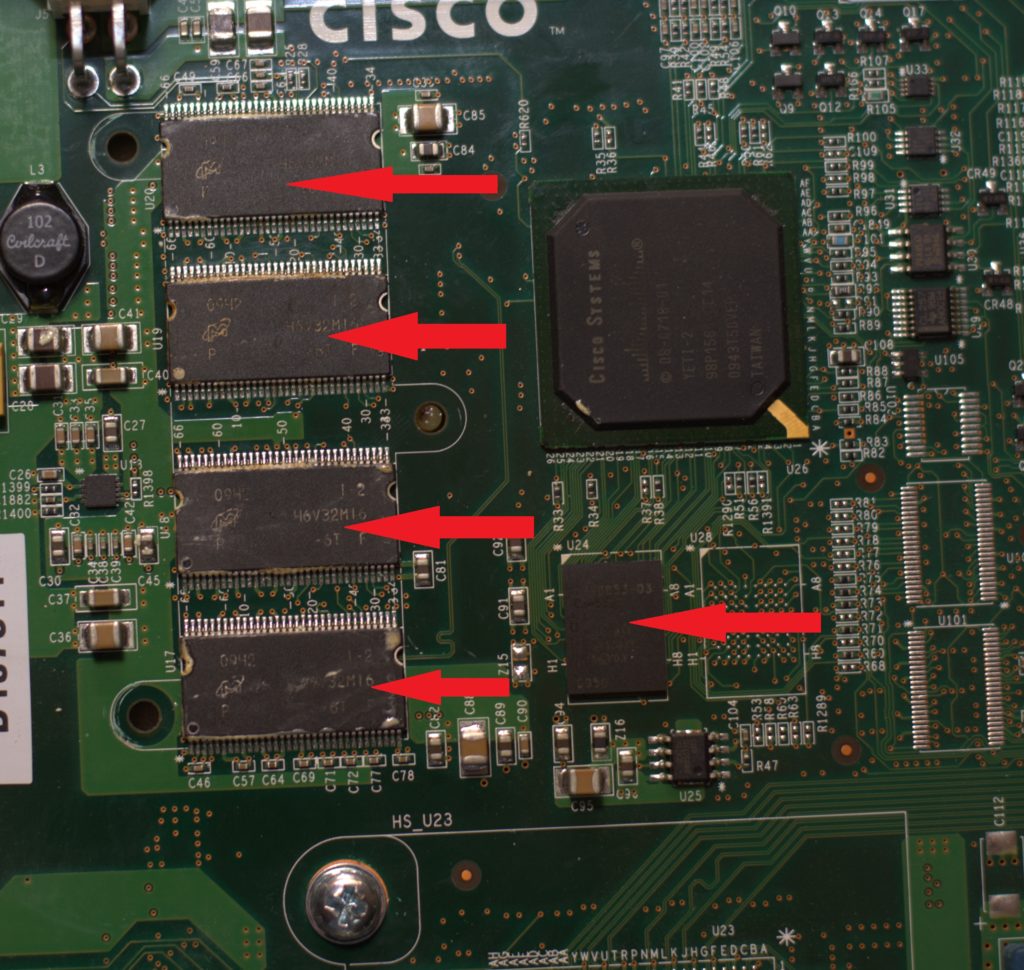
It is the hardware, the memory component.
http://www.cisco.com/c/en/us/about/supplier-sustainability/memory.html
http://www.cisco.com/c/en/us/support/docs/field-notices/637/fn63744.html
A temporary fix?
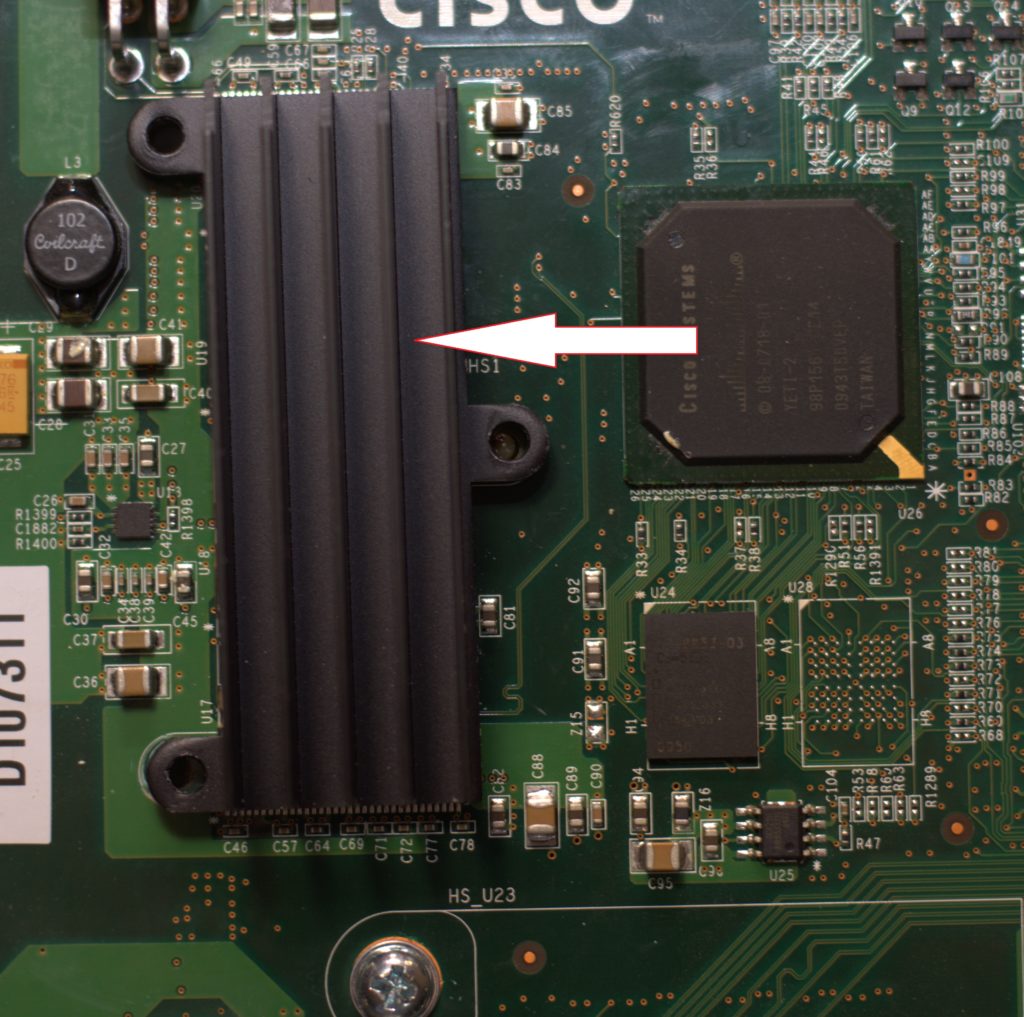
Open the case and remove the heat sink.

Use a hot gun to heat up the memory components for about 5-10 mins. This will “reflow” the solder connections on the chips.

Here is more info if you would like to read.
Good luck!
*********************************************************************************
Create Vlans
Name VLans
Assign Ports to Vlans
Assign an ip address to vlan
Note : to assign multiple ports interface range g1/0/10-20
to avoid switchport becoming trunk port switchport mode access
*********************************************************************************
show run command does not display the vtp info if vtp is not in transparent mode, here is the reason:
…a VLAN database was introduced into Cisco IOS Software as a method to immediately save VTP updates for VTP clients and servers. In some versions of software, this VLAN database is in the form of a separate file in NVRAM, called the vlan.dat file. You can view VTP/VLAN information that is stored in the vlan.dat file for the VTP client or VTP server if you issue the show vtp status command.
VTP server/client mode switches do not save the entire VTP/VLAN configuration to the startup config file in the NVRAM when you issue the copy running-config startup-config command on these systems. It saves the configuration in the vlan.dat file. This does not apply to systems that run as VTP transparent. VTP transparent systems save the entire VTP/VLAN configuration to the startup config file in NVRAM when you issue the copy running-config startup-config command.
Configure a trunk port
+++++++++++++++++++++++++++++++++++++++++++++++++++
To check Trunk or Vlan info
note: show cdp neighbors
Show interface trunk
show int g1/0/10 trunk
show run
show vlan
show interfaces g1/0/23 switchport (to check a interface status, trunk, etc)
Example:
To enable the function Type: switchport port-security
To check a port security status type: show port-security (show port-security int g1/0/24 for detailed info)
To bring a port from a shutdown state:
Configuring SSH on a Cisco Device
enable
conf t
hostname abc
no IP domain-lookup
line con 0
login
password abcd
logging sync
line vty 0 4
login
password abcd
exec-timeout 0 0 (minutes seconds, 0 means unlimited)
(exec-timeout ? ? to set a time for admin console to log off)
or
line vty o4
login local
(this will use the local account to log into the system)
use the following command to create a local user
conf t
username John secret abc123
enable secret abc (encrypted password for console and telnet to enter/enable privilege mode)
enable password abc (clear text, no encrypted password for console and telnet to enter/enable privilege mode)
If none above enabled, a user can log into console and access the privilege mode without using a password. A Telnet user can use the telnet password to access and enter the privilege mode.
interface vlan 1
ip address 10.10.10.10 255.255.255.0
no shutdown
switch(config)#ip default-gateway 1.1.1.1
interface g3/0/24
shutdown
Banner motd ^abc^
copy running-config startup-config
or
Write mem
note : service password-encryption (encrypt lin con & line vty pw)
show ip interface brief
show run (do show run)
show ip route