September
26
September
21
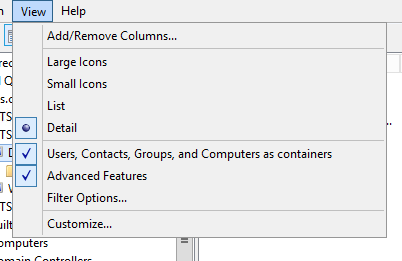
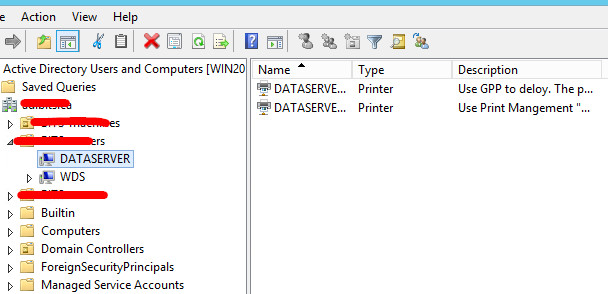
Mac Create Mobile Account for AD User

September
13
Solution to Windows 7 Updates Taking Forever
September
8
Google Chrome- Update Adobe Flash Player Manually
September
6
Google Chrome Bookmarks Location
September
6
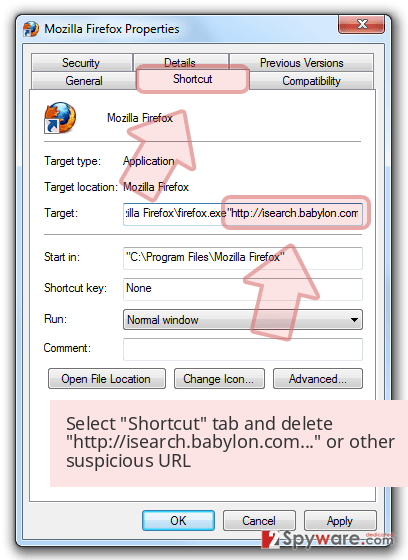
Web Browser Shortcut Hijacking
September
2
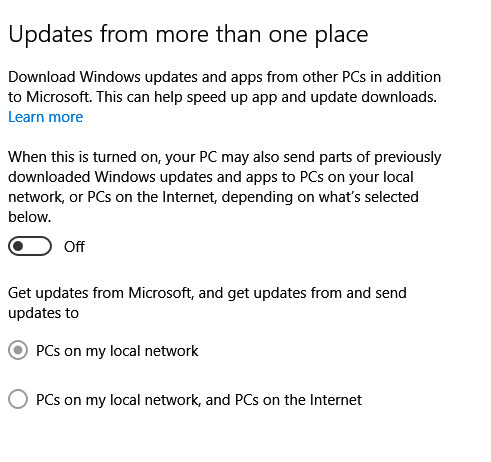
Internet Slow While Doing Windows 10 Updates
August
31
PaperCut Install Steps for Mac Lab
- Make a master image
- Install the papercut client and printer drivers and delete all the printers
- Colone Image
- Delete Superduper!
- Rename Computer
- Disable WiFi Settings (Go to System Preferences → Network, select your Wi-Fi service and click Advanced…. Enable Require administrator authorization to: Change networks.
- Join to Domain
- Add Printers
- Remove the default user account only keep Mac user account
For Mobile users, laptop users
Go to system preferences -> open Directory Utility -> make sure “create mobile account at login” is checked.
August
30
Install PaperCut User Client on Mac OS X
To install the User Client on a multi-user system:
- Start and log in to the Mac computer.Ensure the Mac computer is connected to the network.
- Open the Finder.
- From the Go menu, select Connect to Server
- Enter the pcclient share’s connection details, for example, smb://server_name/pcclient
- Enter password information if requested.
- Drag the PCClient (or legacy/PCClient on OS X 10.6 or lower) package to the local hard disk’s Applications folder. The copy process begins.
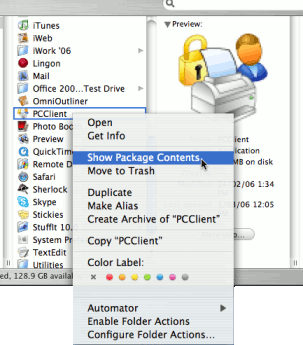
- In the Applications directory, Control+click the newly copied PCClient application.
- Select Open Package Contents.

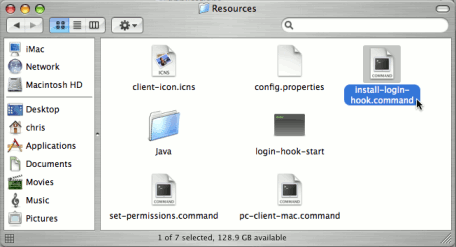
- Navigate to Contents/Resources/.
- Double-click the install-login-hook.command script.

- Restart the system and verify the client starts on login.
August
29